> For the complete documentation index, see [llms.txt](https://docs-v2.autoforwardtelegram.com/llms.txt). Markdown versions of documentation pages are available by appending `.md` to page URLs; this page is available as [Markdown](https://docs-v2.autoforwardtelegram.com/filters/filter-by-type.md).
# Filter By Type
{% hint style="info" %}
This menu is used to filter messages by type. Using it will tell **BOT** which messages you want **to process** and which ones **to ignore**
{% endhint %}
{% hint style="success" %}
### **Download Mobile App or use Web**
✅ **iOS** → [App Store](https://apps.apple.com/us/app/autoforward-for-telegram/id6447486093)\
✅ **Android** → [Google Play](https://play.google.com/store/apps/details?id=com.autoforward.telegramforward)\
✅ **Web** → [web.autoforwardtelegram.com](https://web.autoforwardtelegram.com/)
{% endhint %}
If you want to skip certain Telegram messages or clean up their content before forwarding, Auto Forward Messenger’s [Cleaner](/filters/cleaner.md) and Filters features are exactly what you need. **The Filters feature lets you skip entire messages** based on specific conditions, while **the** [**Cleaner**](/filters/cleaner.md) **actively removes** unwanted elements from within each message—such as links, emojis, hashtags, or other clutter.\
\
Whether you’re managing a crypto channel, curating content, or forwarding to a group, these tools give you more control and better automation.
### 🚫 What Is the Filters Feature?
Unlike Cleaner, which fine-tunes message content, **Filters give you a way to skip forwarding entire messages** when they match specific rules.\
\
For example, you can block messages that contain links, consist only of plain text, or include certain keywords. This level of control is especially useful when managing high-volume channels.
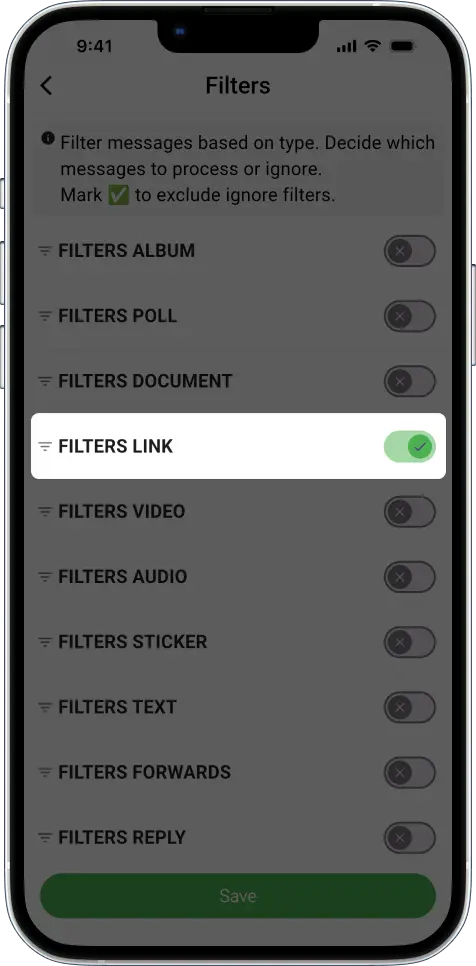
**Example 1: Filter Out Messages with Links**
To block link-based messages from being forwarded:
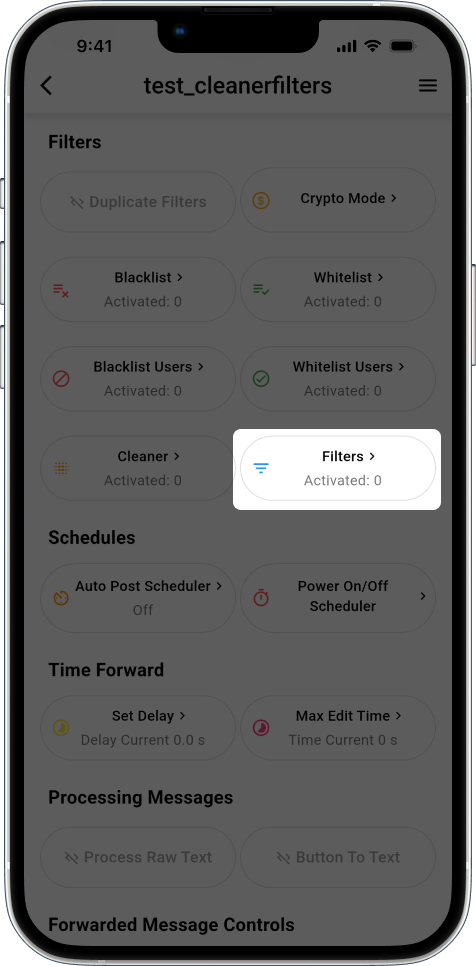
1. Go to the **Filters** tab.
2. Enable **Filter → Links**.
3. Send a message with a URL to your source chat.
That message will be skipped automatically. Others without links will go through as normal.
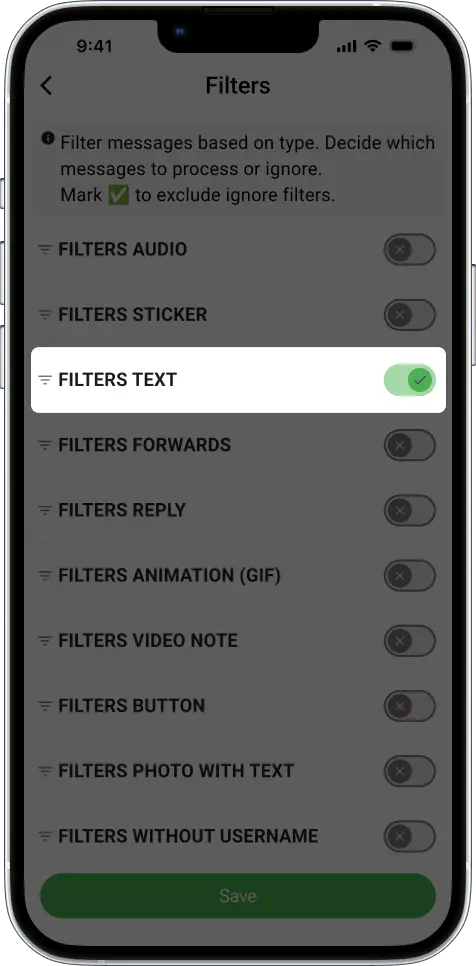
**Example 2: Block Text-Only Messages**
If you’re tired of clutter, this one’s for you. Enable **Filter → Text** to prevent plain text messages from being forwarded. Meanwhile, media or image messages will still go through.
***
### 🔎 Filters – Control What Messages Get Forwarded
The Filters feature lets you decide which message types to include or ignore in each task. This gives you full control over what gets forwarded.
> ✅ Turn ON any filter to exclude that message type from being forwarded.
#### 📑 All Available Filters
| Document | Ignore document messages (e.g., PDF, DOCX) |
| ---------------- | ---------------------------------------------------------------------- |
| Video | Ignore video messages |
| Audio | Ignore audio messages |
| Sticker | Ignore sticker messages |
| Text | Ignore messages that contain text |
| Photo | Ignore photo messages |
| Photo Only | Ignore photo messages that don’t include any text or caption |
| Photo With Text | Ignore photo messages that contain a caption/text |
| Album | Ignore album-style media (multiple photos/videos grouped together) |
| Poll | Ignore Telegram poll messages |
| Voice | Ignore voice messages (voice notes) |
| Video Note | Ignore round/circular video notes |
| Animation (GIF) | Ignore animated GIFs |
| Forwards | Ignore messages that are forwarded from other chats |
| Reply | Ignore messages that are replies to other messages |
| Link | Ignore messages that contain links (URLs) |
| Button | Ignore messages that contain buttons (inline keyboards) |
| Without Username | Ignore messages from users who don’t have a username (only for groups) |
| Outgoing | Ignore messages that are sent from the target group/channel itself |
***
{% embed url="" %}
#### Telegram Auto Forward Cleaner vs. Filters – What’s the Difference?
Here’s a quick breakdown:
| Feature | What It Does |
| ---------------------------------- | ------------------------------------------------------------------------ |
| [**Cleaner**](/filters/cleaner.md) | Removes parts of a message (e.g., emojis, URLs, hashtags) from a message |
| **Filters** | Skips or blocks entire messages if they match certain conditions |
➡️ For the best results, use both together. That’s why many Telegram admins, content curators, and crypto traders trust Auto Forward Messenger—it gives them cleaner automation and smarter control.
#### Final Thoughts on Telegram Auto Forward with Cleaner and Filters
In conclusion, the Cleaner and Filters features offer flexibility and precision. Whether you’re removing visual clutter or filtering out unwanted messages, these tools empower you to customize your Telegram workflow effectively.\
\
👉 Try them today. Open [Auto Forward Messenger](https://blog.autoforwardtelegram.com/how-to-auto-forward-telegram-messages.html) and customize your automation for a better Telegram experience!
***